What the report compares
Small differences that matter before you pay a deposit
We read each document you upload and line up four details across all of them. Where they don't match, the report says so in plain language.
Owner's name
A different middle initial can mean a different person, or an unsettled estate.
Lot and block number
The lot being shown to you may not be the lot on the title.
Land area
You could be paying for area that isn't on the title.
Property address
A different place name can point to the wrong parcel.
What lands in your inbox
Findings first, in plain language
The bottom line is on page one, and every flag says what to do next.
- A bottom line you can read in 30 seconds
- Flags ranked High, Verify or Collect
- What each document says, side by side
- Which documents were missing or unreadable
2 of 4 details do not agree across the title and tax declaration. Resolve these before paying a deposit.
Inside the report
See the land before you see the seller again
We plot the property from the technical description on the title, then check it against satellite imagery and public government data.
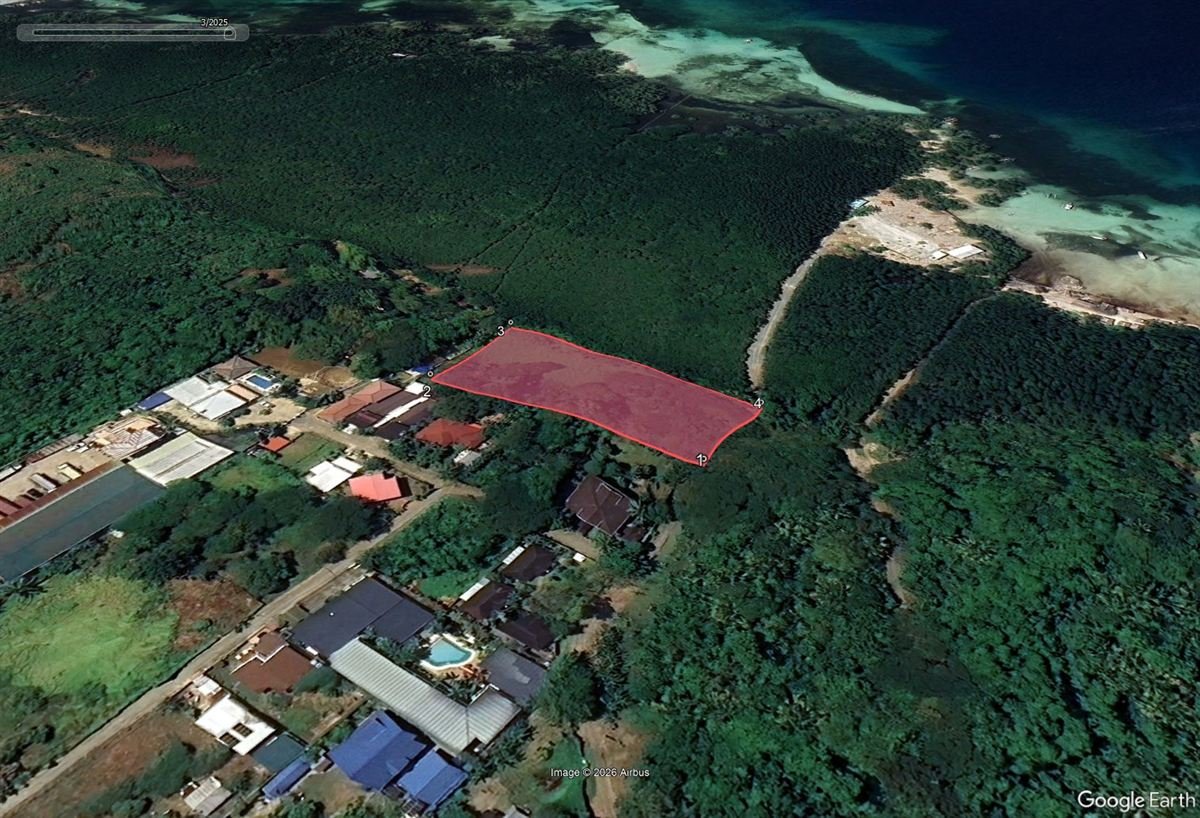 1Mangrove forest behind the lot
2Shoreline nearby
3Access: confirm right of way
1Mangrove forest behind the lot
2Shoreline nearby
3Access: confirm right of way
Spot the red flags early, not after the deposit
Things that look fine on paper can look very different once the lot is on the map. The report points out what to ask about before you commit.
- 1Lot sits next to mangrove forest. Ask whether any part is classified as forest land or timberland.
- 2Close to the coast. Check for storm surge exposure and the shoreline easement.
- 3The road stops at the lot edge. Confirm legal access and right of way in writing.
Know the shape, the boundaries and the road, in metres
Every corner and side from the title's technical description, drawn to scale, so you can compare it with what is fenced on site.
- Total area
- 1,994 sq m · 2 lots
- Lots
- 12-A (994) · 12-B (1,000)
- Road frontage
- 25.76 m, west side
- Road width
- 10.00 m
The Hazard Screening report adds:
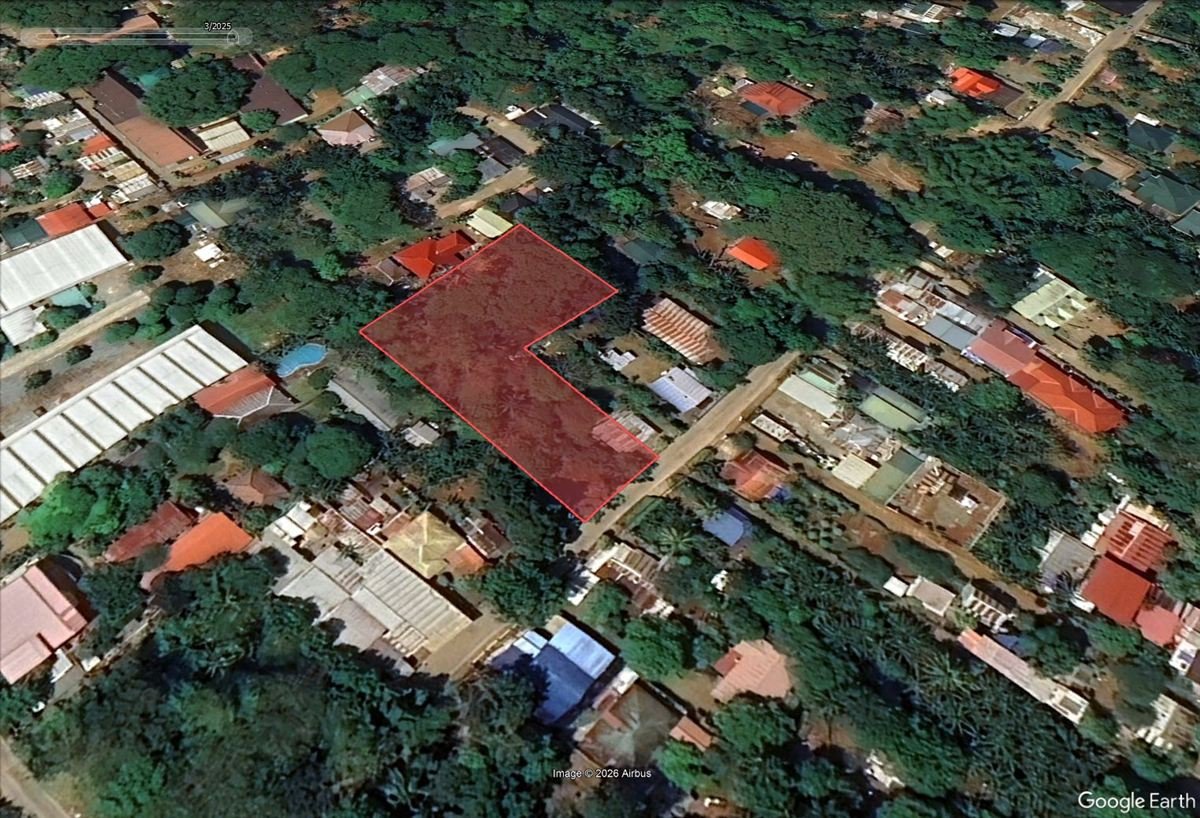 ✓Road along the lot's edge
✓Your plot, on real imagery
✓Road along the lot's edge
✓Your plot, on real imagery
See your property plotted on Google Earth
Every report includes your lot drawn on satellite imagery. Our reviewer places it by hand, so you can see where the land really is.
- See the neighbours, the trees and what's already built on it
- Spot the road, the shore or the forest next to the lot
- Check the lot you were shown is the lot on the title
With Hazard Screening you also get the Google Earth file (KML), so you can open the boundary yourself and measure distances.
Start your check
Four steps. You see the total before you pay.
How it works
- Choose your report and add your documents. Photos or PDFs. A phone photo is fine if it is sharp, well lit, and the document fills the frame. No account needed, just your email address.
- Review and pay. You see the total before you pay, by card, GCash, Maya or GrabPay.
- Get your report by email within one working day (Monday to Friday, excluding public holidays). A person reviews every report before it is sent.
1Choose your report
What's the difference?
| What you get | Document Consistency Report | Document Consistency Report + Hazard Screening |
|---|---|---|
| Your documents | ||
| Every document read for you — title, tax declaration, tax map, back pages | ✓ | ✓ |
| Owner name, lot and block, area and address compared across all of them | ✓ | ✓ |
| Findings first, in plain language — page 1 tells you what matters | ✓ | ✓ |
| Back-page entries explained — restrictions, annotations, what they mean | ✓ | ✓ |
| Your land | ||
| Lot shape and boundaries drawn to scale, in metres | ✓ | ✓ |
| Your lot plotted on Google Earth satellite by a person | ✓ | ✓ |
| Google Earth file (KML) — open the boundary yourself and measure | — | ✓ |
| Barangay boundary check — is the lot in the barangay the title says? | — | ✓ |
| Safety and access | ||
| Flood, storm surge and landslide screening | — | ✓ |
| Road access check — the distance to the nearest road, and whether the lot touches one | — | ✓ |
| Nearby landmarks and distances — airport, city hall and more, within 10 km | — | ✓ |
| Service | ||
| Reviewed by a licensed broker before it is sent to you | ✓ | ✓ |
Already have a Document Consistency Report for the same property? Email orders@titlecheckpro.app to upgrade to Hazard Screening and pay only the difference.
2Where should we send it?
Your report is sent to this address.
Printed as “Prepared for” on your report. Leave it blank to leave it off.
3Add your documents
Choose all your documents at once — the title, the tax declaration and anything else you were given. Photos or PDFs. A phone photo is fine if it is sharp, well lit, and the document fills the frame.
How we handle and delete your documents: Privacy Policy.
Tick the data privacy box above to choose your documents.
4Review and accept
- Report
- Documents
- Regular price
- Promo
What this report is — and what it is not
About the hazard screening
By continuing to payment you agree to our Terms of Service and Refund Policy.
Checking your payment…
✓Payment received
- Reference
- Report
- Paid
Keep this page's link — it is how you check this order, and anyone who has it can see the order. Don't post it anywhere public.
Plain about the limits
What this report is, and what it is not
It is
- A reading of the documents you upload: what each one says on its face
- A comparison across them for registered owner name, lot and block number, area and property address
- A written list of the inconsistencies found among those documents
- Reviewed by a person before it is sent to you
It is not
- A Registry of Deeds search or a Certified True Copy
- A confirmation that a title or any document is genuine
- A survey, appraisal or hazard certification
- Legal advice, or a substitute for a lawyer, licensed real estate practitioner or geodetic engineer
Your documents
Your documents, and what happens to them
Used only to prepare your report. They are read with automated tools, and the report is reviewed by a person.
Stored privately. They are not public, and only the people preparing your report can open them.
Deleted after 30 days. Your documents are deleted 30 days after your report is sent. Want them deleted sooner? Reply to the email your report came in, and we will delete them.
Who runs TitleCheckPro
A licensed Philippine real estate broker, not an anonymous app
TitleCheckPro is a service of Homz Realty Corporation. Nelson Portales, PRC Real Estate Broker Licence No. 29559.
- Company
- Homz Realty Corporation
- SEC Reg. No.
- 2023050100725-33
- Office
- Unit 207 Goland Plaza, Malvar Street, San Miguel, Puerto Princesa City, Palawan 5300
Questions before you order?
Message us. A person replies during working hours, Monday to Friday.
Message us on Messenger Viber: +63 917 835 7852 WhatsApp: +63 917 835 7852 Email: orders@titlecheckpro.appFAQ
Questions buyers ask
Is this a real company?
Yes. TitleCheckPro is a service of Homz Realty Corporation. Nelson Portales holds PRC Real Estate Broker Licence No. 29559.
My documents are just phone photos. Is that enough?
Usually, yes. A phone photo is fine if it is sharp, well lit, and the document fills the frame. Where a document is unreadable or incomplete, the report says so and draws no conclusion from it.
Do you check the title at the Registry of Deeds?
No. The report reads the documents you upload and compares them with each other. A Registry of Deeds check needs a Certified True Copy of the title, which is a separate step.
Can you tell me if a title is fake?
No. The report does not confirm that any document is genuine. It shows whether the documents you were given agree with each other.
What if I don't have every document?
Upload what you have. Where a document is missing, the report says so and makes no comparison with it.
What if no inconsistency is found?
You still receive the full report. It means no inconsistency was found among the documents you uploaded, for the details compared. It does not mean the documents are genuine or that the property is free of problems.
How long does it take?
Your report is emailed within one working day (Monday to Friday, excluding public holidays). A person reviews every report before it is sent.
How do I pay?
By card, GCash, Maya or GrabPay. You see the total before you pay.
Can my documents be deleted sooner?
Yes. They are deleted automatically 30 days after your report is sent. To have them deleted sooner, reply to the email your report came in.
Do I need to create an account?
No. You only need an email address, which is where your report is sent.