How it works
Three steps from documents to a listing you can show
Upload the documents
Photos or PDFs of the title, tax declaration and tax map. Several lots on one title, and split-page titles, are handled.
Review the reading
See what each document says, side by side, and where they disagree. Correct anything the reader got wrong before you go on.
Plot, report and list
Place the lot on satellite imagery, download a branded report, then turn the same reading into an ad and a listing.
What's inside
Everything a title takes, after you get it
Title reading
Owner, lot, area, technical description and annotations pulled from photos and PDFs. You stay in control and can correct any field.
Document cross-check
Owner name, lot and block, area and address lined up across the title, tax declaration and tax map, with plain-language flags.
Plot on satellite
The lot drawn from its bearings and distances onto real imagery, with a Google Maps link, Street View and a Google Earth (KML) file.
Hazard screening
Flooding, storm surge and landslide exposure, road access and distances to landmarks, assembled for the due diligence file.
Consolidate lots
Joined lots and multi-lot titles combined into one sketch and one report, with a suggestion for which lots belong together.
Ad copy, flyer and Authority to Negotiate
A warm, accurate ad from the real facts, editable before you use it. A flyer PDF and a Word Authority to Negotiate, ready to send.
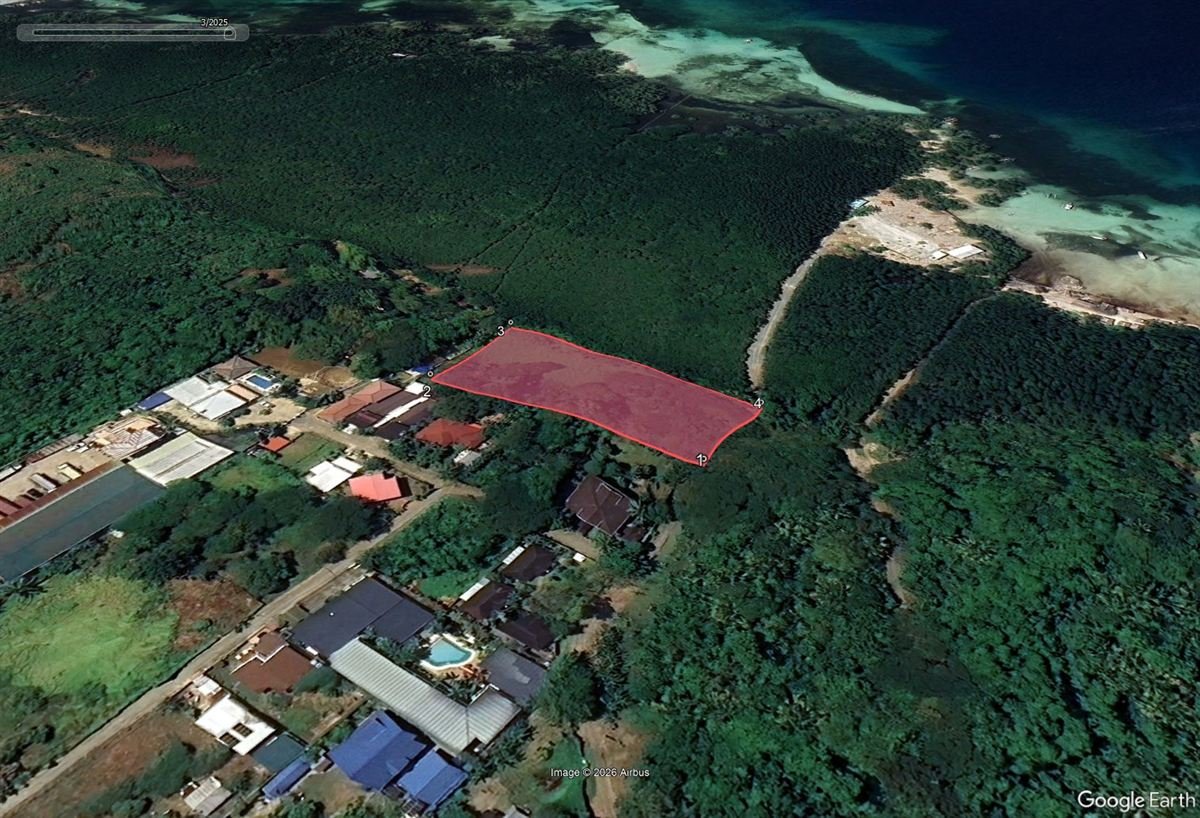 1Mangrove forest behind the lot
2Shoreline nearby
3Confirm right of way
1Mangrove forest behind the lot
2Shoreline nearby
3Confirm right of way
Plot and screen
Show your client the land, not just the paper
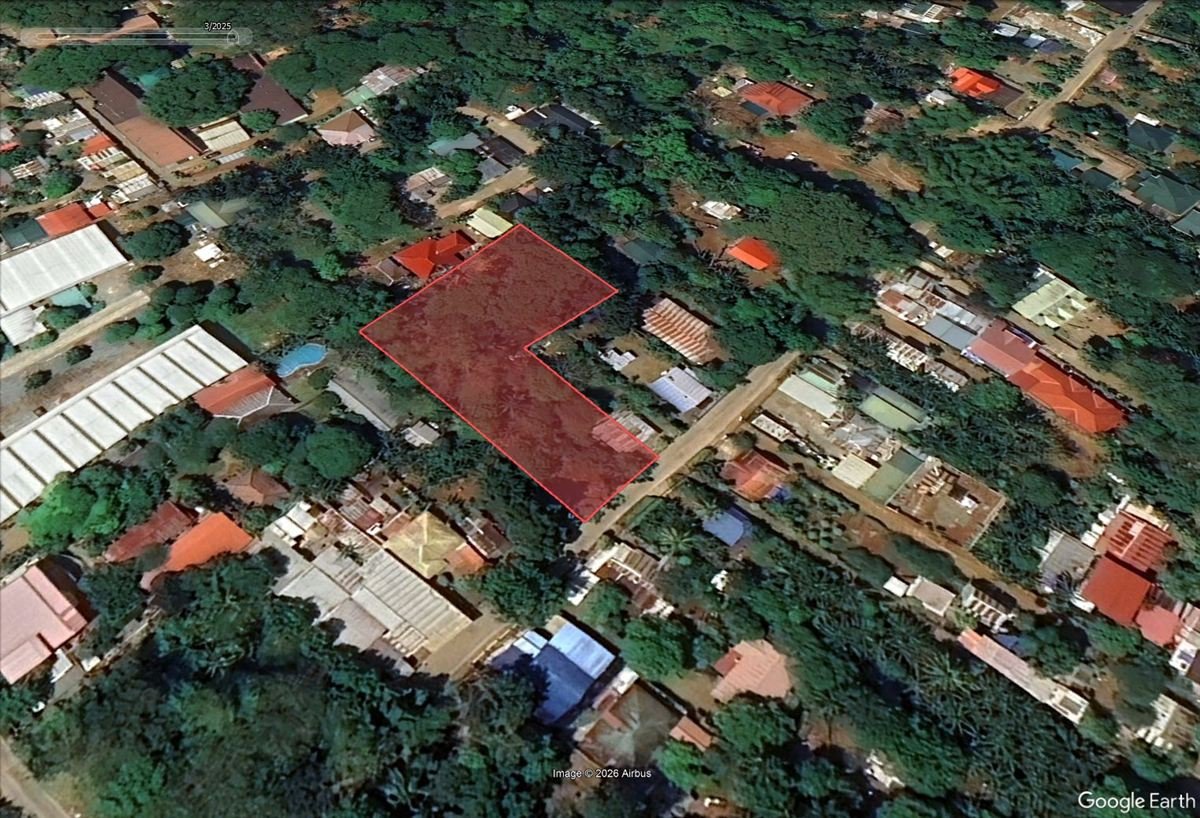
The lot is drawn from the title's bearings and distances onto real imagery, so you and your client can see the road, the shore, the neighbours and what is already built.
- Open it in Google Maps or Street View with one click
- Download the boundary as a Google Earth (KML) file
- Red flags to ask about: forest land, coast, road access
In every reading
Corners, sides and road frontage, in metres
A clean reference sketch for the file and for your client. It also checks that the description closes and that the area matches the title, and suggests a correction when it does not.
Consolidation
Buying or selling several lots? See them as one parcel
Join the lots from separate titles into one plot, with the shared boundaries dashed, one total area and one outline you can place on the satellite map.
- It suggests which of your saved readings adjoin and belong together
- Checks the joined outline closes and the total matches the titles
- One consolidation report, one Google Earth file
Licence No. 00000 · your contact details
2 of 4 details do not agree across the title and tax declaration. Resolve these before the buyer pays a deposit.
Reports that carry your name
Hand your client something that looks like your work
Every report is branded with your logo, licence number and contact details. Preview it, edit it, then download a PDF or Word file, or email it straight to your client.
- Findings first: a bottom line your client reads in 30 seconds
- Flags ranked High, Verify or Collect, each with the next step
- Choose which sections go into the report
- Saved readings kept by requester, ready to reopen
Listing website
The reading becomes a listing, and the listing becomes a website
Add a property from a reading and it can appear on your own public website, with search filters, a map, an inquiry form and every inquiry collected in one place.
- Your logo, your colours, even your own domain name
- Rent, lease or sale, with building details and photos
- Inquiries land in your Leads tab and your inbox, with where they came from
- Your team shares one pool of listings and readings
Listing Map + cross-listing
List it once. Be seen on every broker's website.
Every property you list is plotted on a satellite map, filterable by price and size. One click puts it on your website, and one more cross-lists it onto other brokers' websites, so more buyers see it and you share the deal.
Changed the price or the ad? Press "Update listing on the map" and the website follows. Add the ad and website copy first, then one click does the rest.
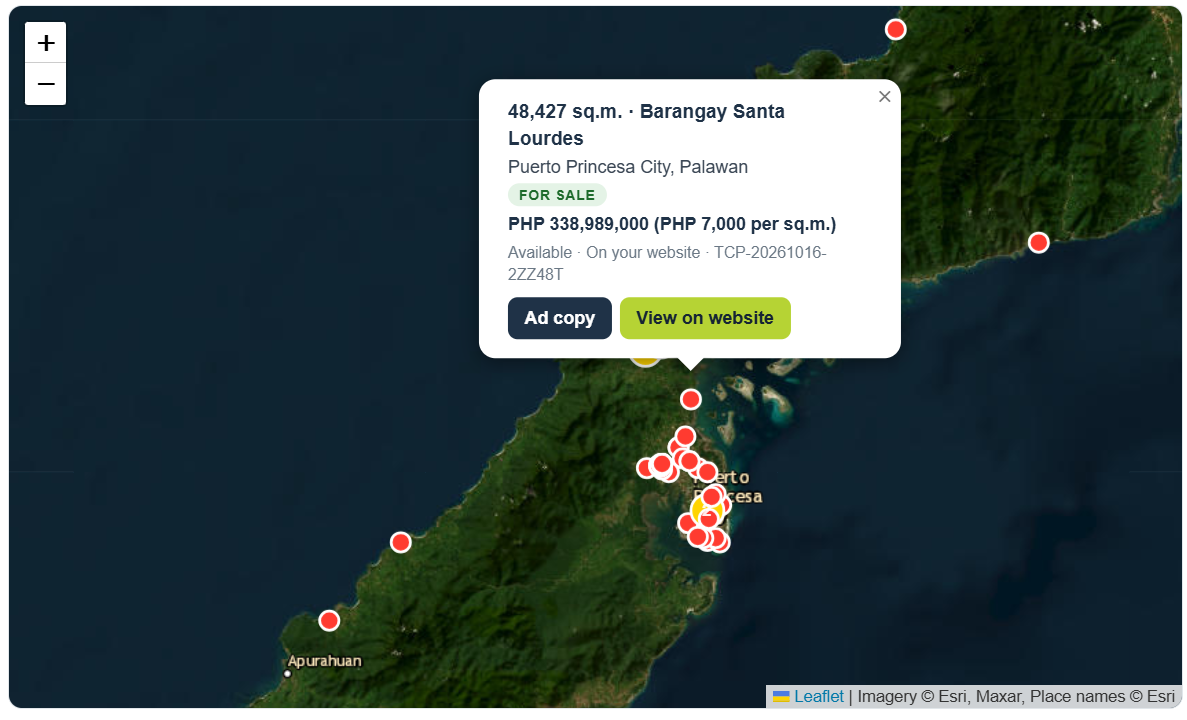
Your whole inventory on one satellite map
- Zoomed out, pins show where your inventory is; zoom in and every lot is drawn as its real outline
- Status at a glance: Available, Reserved, Sold, Withdrawn
- Filter by total area, total price or price per sq m, and show prices in other currencies for overseas buyers
- Hover a lot for its size and price, then open its ad copy
More websites, more buyers, shared deals
- One button, "Cross List this Property", puts an Available listing on other participating brokers' websites
- The same property can't be listed twice: the system checks the title details and the lot outline
- The inquiry goes to the broker whose website it came from, so you co-broke instead of competing
- Other brokers see your lot as an approximate circle or the exact outline, depending on their plan
Who it's for
Made for brokers who handle land every week
Pricing
Start free. Pay only when it earns its keep.
Pay for one reading at a time, or go unlimited by the month or the year with your own API key.
Free trial
Look around and try your first reading.
- Create an account in a minute
- Try the reading tool
- No card needed
Paid plans
Pay-per-report, Monthly and Annual.
- See today's prices when you create your free account
Pay by card, GCash, Maya or GrabPay. Prices in Philippine pesos. See the Refund Policy. Need a team plan or your own domain? Talk to us.
Plain about the limits
What TitleCheckPro is, and what it is not
It is
- A reading of the documents you upload, and a comparison across them
- A satellite plot from the title's technical description
- A screening of hazards and access, to decide what to look at next
- A time-saver that you review and correct before it goes to a client
It is not
- A Registry of Deeds search or a Certified True Copy
- A confirmation that any document is genuine
- A survey, appraisal or hazard certification
- Legal advice, or a substitute for a lawyer or geodetic engineer
Your clients' documents stay private. They are stored privately, never made public, and are not used for anything except your reading. See the Privacy Policy.
Who runs TitleCheckPro
Built by a working Philippine broker, not an anonymous app
TitleCheckPro is a service of Homz Realty Corporation. It grew out of the daily work of reading titles and listing land, and it is still improved every week from what brokers tell us.
- Broker
- Nelson Portales, PRC Real Estate Broker Licence No. 29559
- Company
- Homz Realty Corporation
- SEC Reg. No.
- 2023050100725-33
- Office
- Unit 207 Goland Plaza, Malvar Street, San Miguel, Puerto Princesa City, Palawan 5300
Want a walk-through first?
Message us. A person replies during working hours, Monday to Friday.
Message us on Messenger Viber: +63 917 835 7852 WhatsApp: +63 917 835 7852 Email: orders@titlecheckpro.appFAQ
Questions brokers ask
Do I need to be a licensed broker?
The tool is built for licensed real estate practitioners. You add your own licence number at sign-up, and it appears on your reports.
Can I try it before paying?
Yes. Create a free account and try the reading tool. You choose a paid plan only when you want more.
What is the "own API key" on Monthly?
The reading uses an AI service. On Monthly you connect your own key, so your readings are not capped by ours. We keep it encrypted on the server and never show it on screen. If you would rather not manage a key, Pay-per-report needs none.
How accurate is the reading?
Very good on clear photos and PDFs, but never perfect. That is why every field can be corrected before you plot or report. Where a document is unreadable, the report says so and draws no conclusion from it.
Does it confirm a title is genuine?
No. It reads your documents and compares them with each other. A Registry of Deeds check on a Certified True Copy is a separate step, and the report tells your client to take it.
What happens to my clients' documents?
They are stored privately and are not public. You can delete a saved reading at any time, and you can download or delete your account data from your business profile.
Can my staff use it?
Yes. The team workspace shares readings and listings. You decide which tabs each person can use, and staff can prepare listings for you to publish.
Can I use my own website address?
Yes. Your listings can live on your own domain name. We set it up with you, and you can add your own tracking tags.
How do I pay, and can I cancel?
By card, GCash, Maya or GrabPay. Pay-per-report is a single purchase. Monthly and Annual run for the period you paid for. See the Refund Policy for details.
Your next title, read before lunch
Create a free account and run your first reading today.